Engineering
Guide 2026: what schema you need on a website for AI visibility and skill for Claude
By Max Tymoshyn5 min read
Cut to the chase
Google and AI tools read your website to answer questions about your business, and schema is a hidden set of labels in the page code that tells them which fact is which. There's no special schema that gets you into AI answers: a site needs the few types that describe what the business really is, and nothing it can't back up.
What schema is, in plain words
Your website is written for people. A person sees "Mon–Fri, 9 to 6" under an address in the footer and knows those are the office hours. Software reading the same page has to guess whether that's an office, an event or a delivery window.
Schema takes the guessing out. It's a short block of code on each page that visitors never see. In a fixed format, it says: this is the company, this is its address, these are its opening hours, this is the product and its price, this person wrote this article.
Search engines have read these labels for years. Google's AI answers are built from the same pages Search already reads, so the same labels apply there too.
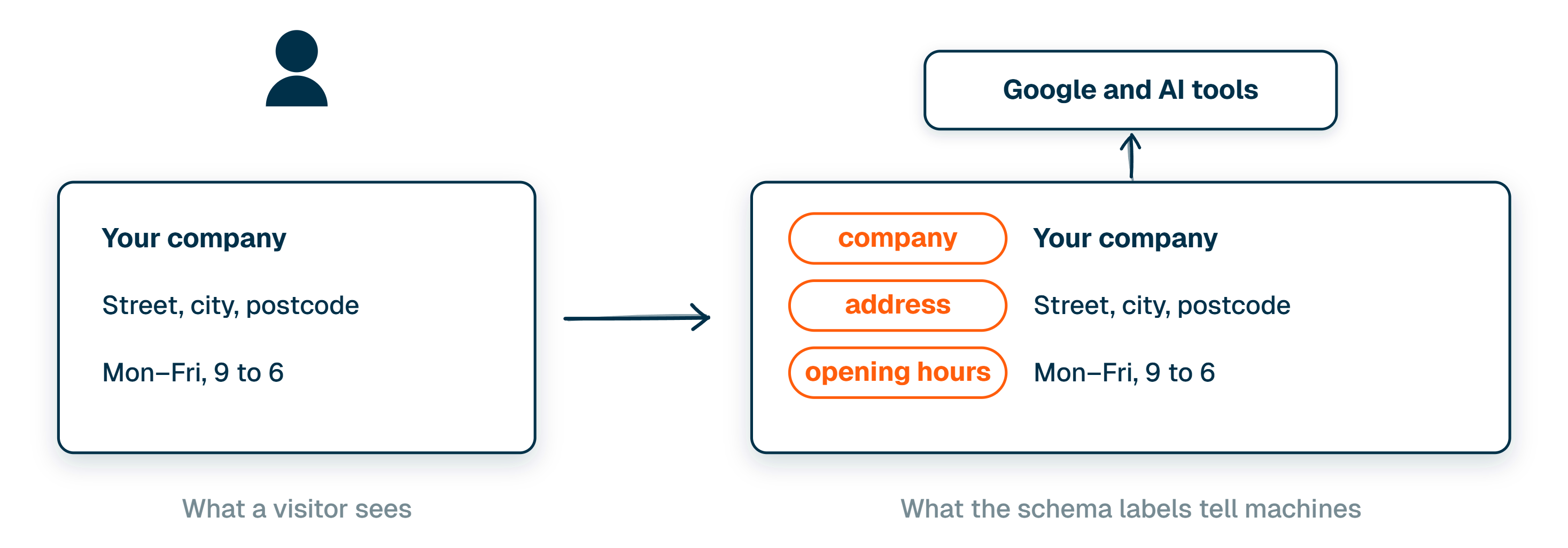
The same labels work for Search and AI
A few weeks ago I posted a 39-second Reel that lists 24 schema types, with a checklist at the end to give to Claude. The checklist says "select what fits your site", and that's the part 39 seconds couldn't explain: no site needs all 24. Schema helps AI understand your business, but there's no separate type made for AI. The same labels that help Google Search help its AI answers.
Google says this outright. To appear in its AI Overviews and AI Mode, a page needs nothing beyond what normal search needs, and the structured data has to match what's visible on the page (Google Search Central).
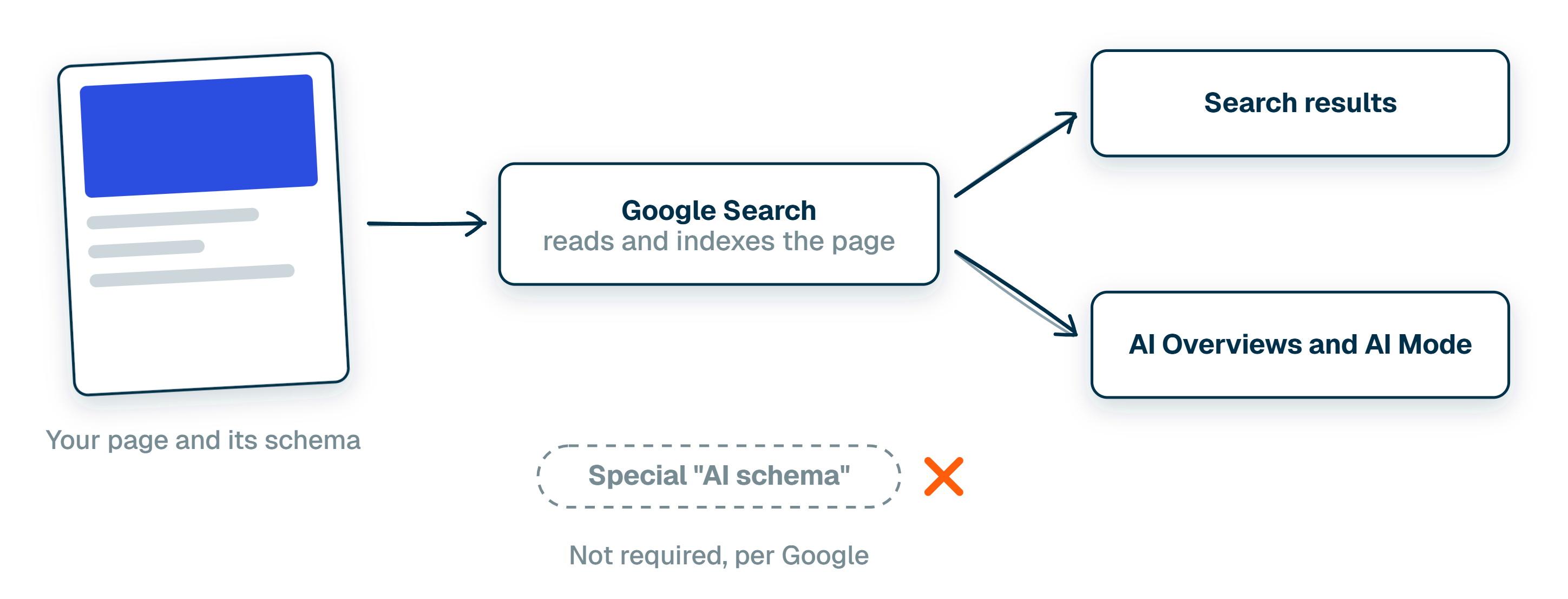
Schema is a set of labels for facts your site already shows. It only helps when every label is true.
So schema doesn't buy a place in an AI answer. What it does is make the facts about your business read the same way to a machine as they do to a person, so nothing has to be pieced together from the page copy.
What we use on our own site
norml.studio uses 17 of the 24 types. Every page carries Organization with PostalAddress (who we are, and the company's registered and main addresses) and WebSite. The homepage adds WebPage, and inner pages add BreadcrumbList, which says where the page sits on the site. Every article adds BlogPosting and Person: what the article is and who wrote it. The team page adds ItemList and FAQPage for the list of people and the questions it answers.
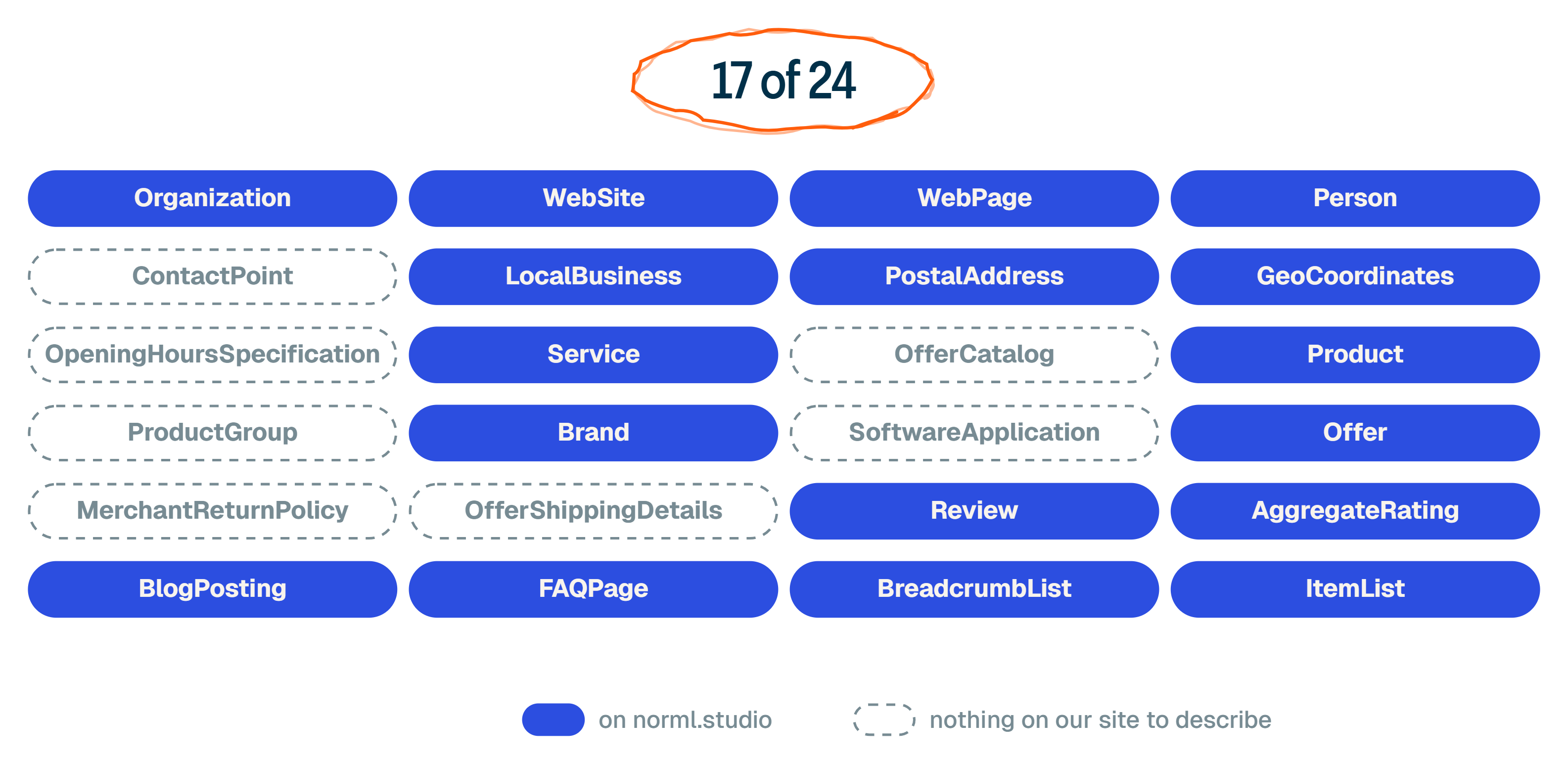
Our product and service pages add Service, Product, Brand and Offer: what we sell, under which name and at what price. Case studies carry Review and AggregateRating for what clients said about the work. LocalBusiness and GeoCoordinates describe our office and where it is on the map.
The other 7, from opening hours to shipping and returns, describe things we don't have, so we leave them out. That's how it usually goes: a small base fits almost every site, and the rest depends on what the business sells.
Which types fit which business
| Where it goes | Schema type | What it tells search engines and AI |
|---|---|---|
| Any website | Organization, WebSite, WebPage, BreadcrumbList, ContactPoint | Who the company is, its official profiles, how to reach it, how the pages connect |
| Articles | BlogPosting, Person | What each article is, who wrote it and when |
| A place customers visit | LocalBusiness, PostalAddress, GeoCoordinates, OpeningHoursSpecification | Where you are, how to find you, when you're open |
| Services | Service, OfferCatalog, Offer | What you sell, how it's packaged, published prices |
| An online shop | Product, ProductGroup, Brand, Offer, MerchantReturnPolicy, OfferShippingDetails | The exact product, its sizes and colours, price, stock, returns, delivery |
| An app | SoftwareApplication, Offer | What the app does, where it runs, what it costs |
| Customer reviews on the page | Review, AggregateRating | Real reviews and the average rating behind them |
| Questions or lists on the page | FAQPage, ItemList | The questions answered on the page, the items in a list |
Where schema goes wrong
Schema causes trouble in three ways, and all three come down to labels that don't match the site.
The first is labelling things that don't exist: a storefront for a business that only works online, a price for a business that only quotes, reviews written to get stars in search results. Google doesn't show review stars for reviews a company publishes about itself on its own site (Google's review rules).
The second is the same facts added twice. Most WordPress SEO plugins already add the company, site and page labels. If someone adds them again by hand, the site now has two versions of the same facts, and they don't always agree.
The third is facts that go out of date. A shop's labels say one price while the cart says another. Prices and stock change, so those labels have to come from the shop's own data, not from text someone typed once.
A wrong label is worse than no label, because it states something false about your business to every machine that reads the page.
What to ask whoever runs your site
You can see what your site says about itself in a couple of minutes: paste your homepage into the free Schema.org validator and look at the list of types it finds. Then ask your team or agency three things:
- Which schema types are on our site, and does each one describe something real that's visible on the page?
- Is anything added twice, once by a plugin and once by hand?
- If we sell online, do the prices and stock in the labels update when the shop does?
Hand it to AI with our schema skill
If you use Claude Code, Codex or another AI tool that works in a terminal, copy the text below and paste it in. It installs our seo-schema skill and runs it on your site. The skill checks what's already there, adds only the types that fit your business, uses only real facts and tells you what it changed. It's built for WordPress sites; on any other site you still get the audit and the code to add.
Install the Norml seo-schema skill: npx skills@latest add normlstudio/norml-seo-schema --skill=norml-seo-schema -g. Then run it on https://yourwebsite.com. Check which schema types the site already has, add only the types that describe something real and visible on the page, use only real facts, and give me a list of what was there, what you added and which facts are missing.TL;DR
Schema is a hidden set of labels in your site's code that tells Google and AI tools which fact is which: the company, the address, the price, the author.
There's no special schema for AI. Google says its AI answers need nothing beyond normal search, and that the labels have to match what's on the page.
Most sites need a small base plus the types for what they actually sell. Our own site uses 17 of the 24. Anything that isn't true shouldn't be labelled at all.
I'm Max Tymoshyn, founder of Norml Studio. We design and build websites, and help teams keep them usable as their content and business change. You can see our work or follow me on Instagram for more website builds and demonstrations.
See more Norml in Google Search
Add Norml as a preferred sourceShare this article