Engineering
The 18 schema types for a service business website, explained
By Max Tymoshyn6 min read
Cut to the chase
Google and AI tools ask the same few things about a service business: who you are, where you work, what you sell, what clients say and how your site is organised. These 18 schema types answer those questions in a form software can read, and you only add the ones your business can back up.
Schema, in plain words
Schema is a short block of code on a page that visitors never see. It labels the facts on the page so software doesn't have to guess: this is the company, this is the service, this is its price, this person wrote the article.
Google Search reads these labels, and Google's AI answers are built from the same pages. There's no separate schema made for AI. Google says its AI features need nothing beyond what normal search needs (Google Search Central).
What it looks like in code
Here's a Service label for Norml Care, our website maintenance plan. Its prices are published on the page, so it can carry an Offer.
{
  "@context": "https://schema.org",
  "@type": "Service",
  "name": "Norml Care",
  "description": "Website maintenance, QA, fixes and ongoing improvements",
  "provider": {
    "@type": "Organization",
    "name": "Norml Studio",
    "url": "https://norml.studio"
  },
  "offers": {
    "@type": "Offer",
    "price": "300",
    "priceCurrency": "USD"
  }
}
Read it line by line: this is a service, it's called Norml Care, Norml Studio provides it, and the price is $300 in US dollars, the lowest monthly plan on the page. A visitor reads the same facts on the page. Google and AI tools read them here without having to guess which number is the price and which name is the company.
What the Reel didn't have time for
A few weeks ago I posted a 27-second Reel that lists 18 schema types for a service business and ends with a checklist to give to Claude. In 27 seconds there was only time for the names. This article explains what each one says about your business, and which ones to skip.
The 18 types, grouped by the question they answer
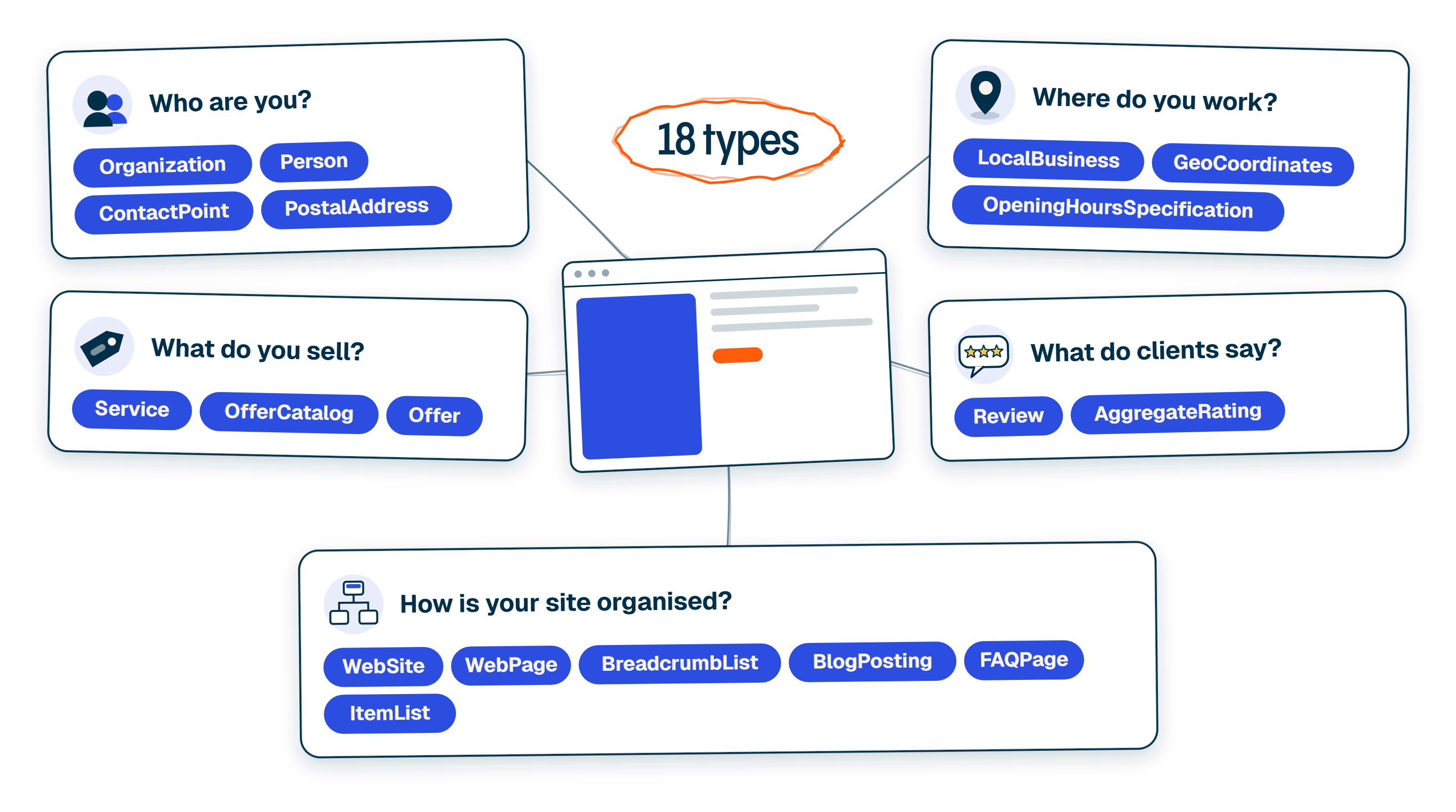
Read the list as five questions that a client, Google or an AI tool asks about your business.
Who are you?
- Organization describes the company and links its official profiles.
- Person describes the people behind it, usually your team and the authors of your articles.
- ContactPoint lists how clients reach sales or support.
- PostalAddress gives your published business address.
Where do you work?
- LocalBusiness says you have a real place clients can visit, ideally as a specific type, like LegalService for a law firm or Plumber for a plumber.
- GeoCoordinates puts that place on a map.
- OpeningHoursSpecification says when it's open.
All three are only for places that exist. A business that works remotely can state the area it serves instead of inventing an office.
What do you sell?
- Service goes on each service page and names the company that provides it.
- OfferCatalog groups your services and packages the way your services page does.
- Offer adds a price, so it belongs only where the price is published on the page.
If you quote every project, leave Offer out.
What do clients say?
- Review marks up one real review.
- AggregateRating gives the average rating and how many ratings it's based on.
Both have to match reviews that visitors can see on the page. Google doesn't show review stars for reviews a company publishes about itself on its own site (Google's review rules).
How is your site organised?
- WebSite and WebPage describe the site and each page on it.
- BreadcrumbList shows where a page sits.
- BlogPosting marks each article with its author and dates.
- FAQPage covers questions answered on the page.
- ItemList covers lists such as your services or case studies.
Schema describes what already exists. It can't add a price, an office or a review your business doesn't have.
Which ones your business needs
Not every service business needs all 18. It depends mostly on where you meet your clients.
You work remotely, like an agency or a consultancy. You need who you are, what you sell and how your site is organised. Leave out LocalBusiness, GeoCoordinates and OpeningHoursSpecification unless clients actually come to your office.
Clients come to you, like a law firm, a clinic or a salon. You need all five groups. Use the specific LocalBusiness type, and keep the address, map point and opening hours the same as on your Google Business Profile.
You go to your clients, like a plumber or a cleaning company. Use LocalBusiness with your real business address and the area you serve. Don't invent a storefront to look local.
What we use on norml.studio
We're a service business too, so this list is our own. norml.studio uses 15 of the 18.
- Organization with PostalAddress describes the company.
- LocalBusiness with GeoCoordinates describes our office and where it is on the map.
- Service and Offer sit on the service and product pages, where the prices are published.
- Case studies carry Review and AggregateRating.
- WebSite, WebPage and BreadcrumbList describe the site, and every article adds BlogPosting and Person.
- The team page adds FAQPage and ItemList.
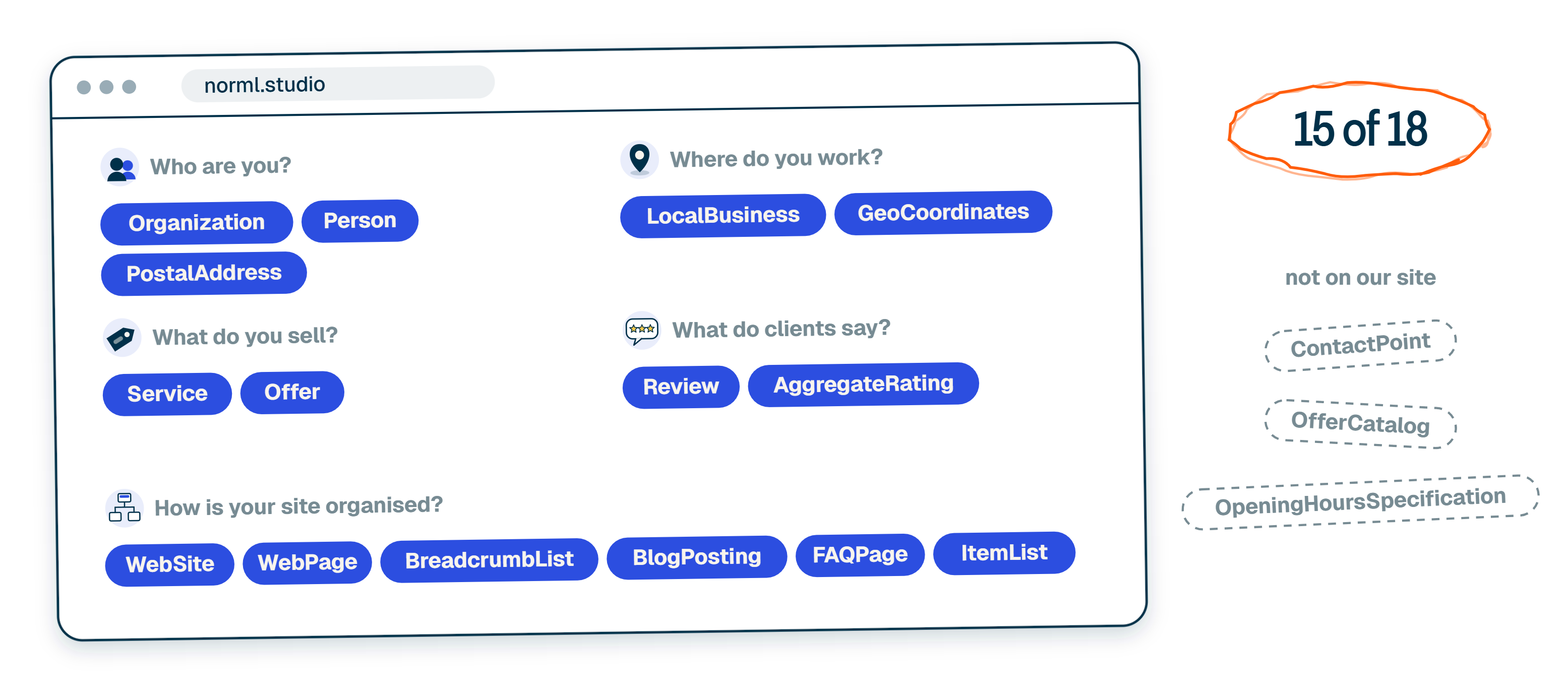
The three we don't use are ContactPoint, OfferCatalog and OpeningHoursSpecification.
What schema gets you, and what it doesn't
Schema makes your facts easy to read. Some types can also earn extras in Google results, like your logo next to your company name. Can is the key word.
"Google doesn't guarantee rich results, even with proper markup." — Google's structured data guidelines
The extras also change. Since May 7, 2026, Google no longer shows the FAQ dropdown under search results for any site (Google Search Central). FAQPage is still a valid label for questions answered on the page. Just don't add it for the dropdown.
What doesn't change is the rule underneath: the labels must describe what visitors can see on the page. Google's guidelines say structured data must be a true representation of the page content.
Mistakes to avoid
- A price in the schema that isn't on the page, or an old price that stayed in the code after the page changed.
- Review stars built from testimonials you picked and published on your own site.
- An office address for an office clients can't visit.
- Schema on the homepage only. Each service page and each article carries its own types.
Where to start
- Check what's already there. Paste your homepage into the free Schema.org validator and look at the list of types it finds. Most WordPress SEO plugins already add Organization, WebSite and WebPage. If someone adds them again by hand, the site ends up with two versions of the same facts, and they don't always agree.
- Fill the gaps in the order of the questions above: who you are, what you sell, then the rest. Add each type only when the page has the facts for it: a published price for Offer, real reviews for Review, an address clients can visit for LocalBusiness.
Hand it to AI with our schema skill
If you use Claude Code, Codex or another AI tool that works in a terminal, copy the text below and paste it in. It installs our seo-schema skill and runs it on your site. The skill checks what's already there, adds only the types that fit your business, uses only real facts and tells you what it changed. It's built for WordPress sites; on any other site you still get the audit and the code to add.
Install the Norml seo-schema skill: npx skills@latest add normlstudio/norml-seo-schema --skill=norml-seo-schema -g. Then run it on https://yourwebsite.com. It's a service business. Check which schema types the site already has, add only the types that describe something real and visible on the page, use only real facts, and give me a list of what was there, what you added and which facts are missing.TL;DR
- Schema is a hidden set of labels in your site's code that tells Google and AI tools which fact is which. There's no separate schema for AI. It doesn't promise extras in Google either: the FAQ dropdown stopped showing in May 2026.
- For a service business, 18 types cover five questions: who you are, where you work, what you sell, what clients say and how your site is organised.
- Add only what your business can back up: a price only if it's published, reviews only if they're real, a location only if clients can visit it. Our own site uses 15 of the 18.
I'm Max Tymoshyn, founder of Norml Studio. We design and build websites, and help teams keep them usable as their content and business change. You can see our work or follow me on Instagram for more website builds and demonstrations.
See more Norml in Google Search
Add Norml as a preferred sourceShare this article